
I've had this N81 8GB prototype for a while now but I haven't written anything about it cos I'm having a hard time coming to a conclusion to what or who it's for.
There's 3G but no HSDPA, so the experience is not as good as an N95 or E90. The camera is a weedy 2 megapixel unit with a near useless LED flash. The interface is half baked compared with the S60 3rd editions that we're used to by now on the latest Nokia devices. These are just a few of my gripes about the device.
Anyway, let's get on with the pics.
Front view
Back view
Side views

Top and bottom views

SIM tray
Slider open
Extra gaming rocker buttons integrated togther with the earpiece
Side by side pics with other phones:


You can see from the pictures that Nokia meant for it to be quite a good looking device. However, the execution is a bit off. Instead of looking classy-ly glassy, it ends up looking more plasticky cheapie. The phone itself is put together well, feeling sturdy and firm. It has the stiffest keys I've ever come across in a phone, requiring quite a bit of strength to press. This is probably done to ensure longevity when gaming, which is what I think this phone is made for. The extra rocker buttons on either side of the earpiece emphasizes gaming intentions.
The speakers are pretty powerful. Much louder than the N95's, they will make gaming more enjoyable I suppose, if you're the type who likes a big soundtrack while playing games. The audio output through the 3.5mm, I must say, is very very good. It's noticeably cleaner and more defined than the N95 and even my iPhone.
The weight of the N81 8GB is pretty hefty. It's weight is closer to the E90 than the N95, giving a further impression of sturdiness.The action of the slider feels very good. The tension of the slider spring is taut, making it feel much better than that of an N95.
There is 8GB of built-in memory and no removable media slot. With the advent of 8GB cards, this is not good, as with all current 8GB models from Nokia. There seems to be plenty of user accessible RAM. I still can't seem to make it crash despite turning on as many applications as I can.
The arrangement of the keys deserve a special mention. Under the screen are 16, yes SIXTEEN command keys. Not the most ergonomic and definitely very prone to accidental presses. But I suppose acceptable given the space constraints.
The keypad keys are very flat and one dimensional, making text input not as tactile as a more contoured keypad. However, it's not too much of a chore.
New in this device is this thing called Naviwheel. It's similar to the iPod concept where you run your finger around the silver square to control the cursor. The thing is, it works only in a couple of menus and it works like a drunk iPod. Sometimes it works, other times it misses. And it's turned OFF by default. Weird. But if Nokia gets this right, it'll be a great navigation tool.
This is a 3G phone with no HSDPA to turbo charge things. Web browsing over 3G is acceptable I suppose, but it ain't no N95 or E90. Wifi and bluetooth work as usual. They took out the infrared port on this device which I don't miss at all.
Being used to Nokia's latest interface on the N95, I'm finding this interface lacking. The thing that irritates me the most is that there's no WLAN scanning menu on the desktop, something that I would think people would wanna use all the time. You have to press the applications button and select "Extras" before you can see the WLAN menu. Too many steps to get to something so commonly used.
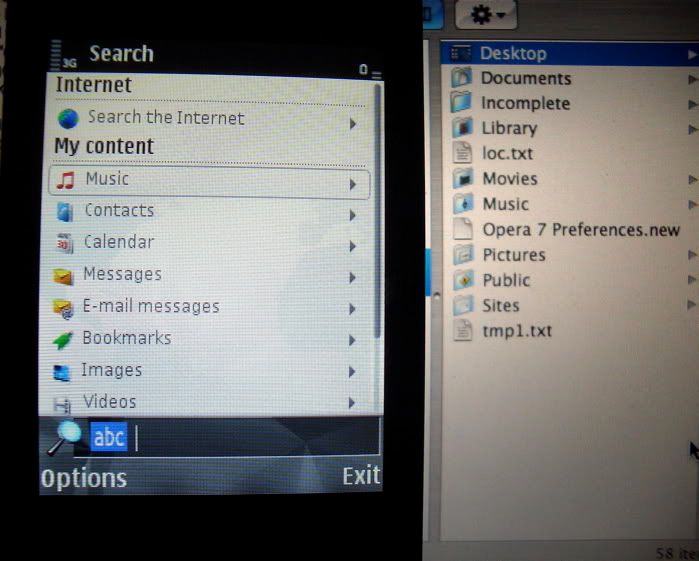
According to other reviews, the search 4.0 application is included in the official release, and that's a great thing. It's like the file browser on the Apple OSX finder. This shot of the search 4.0 application on my N95 8GB placed beside my Powerbook screen:
Let's talk about the camera. I'll just let the pictures do the talking. I've taken pictures of 2 subjects using the N81 8GB, N95, E90 and iPhone. You judge for yourselves. All the phones are simply set to Automatic. I just pointed and shot. All the pictures are compressed with iPhoto with the same resolution settings.
Taken by the N81 8GB (yes, the flash was ON)
Taken by the N95
Taken by the E90
Taken by the iPhone (which we all know is 2MP has no flash)
Round 2.
Taken by the N81 8GB
Taken by the N95
Taken by the E90
Taken by the iPhone
So the N81 is supposedly made for gaming. Trying out the preloaded Ngage demo games, I don't see much difference in playing the same games on my N95 8GB. In fact, playing Asphalt with my N95 8GB proved to be more pleasurable due to it's bigger screen. However, with a fighting game that required 2 hands, the extra buttons beside the earpiece proved to be indispensable. Here a video of that fighting game:
So at the end of the day, who is this phone for? I can't figure it out. I guess if you're someone who is a hardcore phone gamer, someone who values sound quality, someone who doesn't care too much about the camera quality, someone who doesn't use 3G much, someone who likes loud phone speakers, someone who like taut slider springs, this one's for you.
I guess there won't be too many takers...
Friday, November 9, 2007
Nokia N81 8GB

Thursday, November 8, 2007
Dead Powerbook: REVIVED!
So, I have this 550MHZ G4 Titanium Powerbook that I have not turned on for 4 years. I dropped it and cracked the case and one of the screen hinges actually broke, exposing some wires. On top of that, the backlight was becoming really unreliable. Sometimes it would be ok, and most times, the screen would be black. The famous "paint peel" syndrome of Titanium Powerbooks was also apparent on mine.


I bought a 17" Powerbook and just shoved this into a drawer, until a few days ago when I came across it again while doing some spring cleaning. I thought to myself if I can hook it up to my 42" plasma in my bedroom, I can permanently leave my 17" Powerbook downstairs in the living room instead of bringing it up all the time. So a plan hatched.
I checked the back of the Tibook and my Panasonic plasma TV and found that the common factor was VGA. Simple enough. I dug out a VGA cable and hooked them up and voila! There was action! The old neglected Tibook still worked!
But wait a minute. How am I supposed to type and move the cursor while lying in bed? Wireless keyboard and mouse of course! Being a pre-bluetooth machine, I can't just go out and buy a set of bluetooth keyboard and mouse. The cheapest solution, I figured, would be a wireless USB RF keyboard/mouse, right?
So, I went out and bought a S$65 Microsoft RF wireless keyboard and mouse.
And what a waste of money it turned out to be! Anything further than 12 inches, they lose connection. My bed and the computer is a good 8 feet apart. So it looks like bluetooth is the only option.
So I went to my favourite electronics place again to buy a USB bluetooth dongle to add bluetooth capability to my aged Tibook. As it turned out, it's not easy as I thought. Nobody can guarantee that their USB dongles would work with OSX. I finally found one that has a picture of the Mac sign on the packaging and bought it. Went to buy a set of Apple wireless keyboard and mouse. They were really expensive but at least they looked good.

I went home, happily set everything up and crap. It didn't work! Bluetooth can detect my phones and can even transfer files, but no matter what I tried, it just couldn't detect my Apple bluetooth keyboard and mouse!
So, what to do but go online and trawl internet forums? After some serious reading, I found that the only USB bluetooth dongle that has been proven to work with OSX is the D-Link DBT-120. I called my local D-Link number only to find that that model has been discontinued!
Sp did I just spend S$65 (Microsoft RF keyboard/mouse) + S$29 (bluetooth dongle that didn't work) + S$225 (Apple bluetooth keyboard/mouse) for NOTHING??
No! I didn't come this far for nothing?!
I called up D-Link again and found out that the DBT-120 has been replaced by a newer model called DBT-122. According to the website, it supports Mac but with zero details. Searched the internet but did not find any conclusion about it being able to work with OSX.
I decided to take a risk and order it. It wasn't in stock and I had to wait 3 days for it.
After 3 days, it finally arrived!
I pluged it in, crossed my fingersm and YES!!! It works! It detected my keyboard and mouse immediately! I can now surf the internet or do anything I want on my computer in bed with a 42" plasma as my monitor!
The view from my bed:

So, for anyone wondering how to get totally functioning bluetooth into your old Titanium Powerbook, the answer is: D-Link DBT-122.

